FAQ
When is a test considered resolved?
A test result is resolved when a user either links a defect to it or marks it as muted. Both actions indicate that the failure has been analyzed: defect means the failure is a known issue, muted means the failure is intentionally ignored.
What are retries?
A retry occurs when the same test runs more than once within a single launch. Allure TestOps identifies retries by matching the test ID and environment across results in the same launch.
Retries appear in two places: on the launch overview page in the Retries section, and inside the launch on the test results page under the Retries tab of an individual result.
If the environment parameters change between runs, Allure TestOps treats the result as a new test result rather than a retry.
Why are some test case changes not in the change log?
The change log tracks field-level edits to a test case but does not record changes to:
- relations,
- mutes,
- links,
- scenario steps,
- attachments,
- parameters.
Can I use AQL functions in widgets?
No. Functions such as now(), dayStartUtc(), weekAgo(), and currentUser() are not supported in widget queries. Use static values or date picker controls instead.
See: AQL
How to prevent test case creation when running tests on non-main branches
Configure a documentation generation policy in the project's Launches settings. The policy uses AQL to control when automated results are allowed to create or update test cases. You can filter by launch name, launch tags, or environment data to restrict test case creation to specific branches or environments.
For example, to create and update test cases only when the branch is main:
ev["Branch"]="main"
The Branch environment value must be mapped from a CI variable in the project's environment settings, see Create automated mappings.
Cleanup rules are set but the database size is not decreasing
Cleanup rules remove scenario data and artifact links, but the freed space is not reclaimed immediately. PostgreSQL requires additional maintenance operations to physically reclaim space and keep query performance healthy:
VACUUMmarks deleted rows as reclaimable. Run a fullVACUUMperiodically and configure autovacuum for tables that see frequent deletes.ANALYZEupdates the query planner statistics. Run it after large deletes so the planner can generate efficient execution plans.REINDEXrebuilds bloated indexes. After deleting large amounts of data, indexes can retain dead pages that slow down queries;REINDEXcompacts them.
In addition, traces and error messages are not removed by cleanup rules. They are treated as metadata and kept even after all other artifacts are deleted. To limit their size, shorten long traces and messages before writing them to test results, or store them as attachments instead.
See: Storage maintenance
How are licenses counted on a self-hosted instance?
A license is issued for named users. Every account with the Admin or User role takes one seat, no matter how often the person signs in. Guest accounts are free. Seats cannot be shared between people.
To check the current usage, go to Administration → License:
- Seats: the number of seats in your license;
- Total paid licenses used: the number of accounts with the Admin or User role;
- Remaining: how many more such accounts you can add.
If Total paid licenses used is greater than Seats, the instance has more paid accounts than the license allows. Change some of them to Guest or deactivate them. To add seats, contact the Qameta sales team at sales@qameta.io.
What happens when the license expires?
All user accounts switch to read-only mode and all integrations stop working. To restore access, sign in with any account that has the Admin role and enter the new license key in the activation form.
If you cannot sign in through the external identity provider (LDAP, OpenID, or SAML), use a local account with the Admin role: on the sign-in page, select Username and password in the Authentication method list. In versions before 26.3.1, open <your-instance-url>/login/system instead.
If the license has not yet expired, you can update it under Administration → License → Manage licenses.
How to check the Allure TestOps version and instance status
The version number is displayed in the user menu: click your avatar in the upper-right corner.
For a machine-readable status check, open <your-instance-url>/status in a browser or via HTTP. The endpoint returns the application status without requiring authentication.
Since Allure TestOps version 26.3.1.1 we see that all html attachments are displayed as html-unsafe, why is that?
On the cloud this is a platform level security setting and cannot be changed per workspace. Allure TestOps does not render HTML attachments in the browser, because such a file would run with the session of whoever opens the test result, so the content type is reported with an -unsafe suffix and the file is offered as a download instead of a preview. The policy itself is not new, but until 26.3.1 it was not applied to attachments placed inside scenario steps, which is why some of them used to render and now do not. Your attachments are stored exactly as they were uploaded and can be downloaded at any time, nothing is lost or modified. If you want a report visible without the extra download step, attach it in a format that is rendered inline, such as plain text, Markdown or an image.
Why widget's AQL validation shows many results but there is nothing rendered in the widget
A: Widgets except ones having the granularity set via UI return the data for the last 2 weeks only. In order to validate provided AQL system needs more data than the last two weeks as there is quite high probability there is no data for the last two weeks, so we use full history for the validation sake.
Can we get a widget information using API?
A: To retrieve data from a widget, you need to use the following method: GET /api/widget/{id}/data
To use this request properly, we need to know the widget ID:
Go to the dashboards.
Open your browser's DevTools, and look for the data field in the Network tab.
You might have multiple widgets, so you need to ensure that you've found the correct ID.
- To do this, go to the "Response" section and compare the data from the API response with the widget you want (an example is shown in the screenshot).
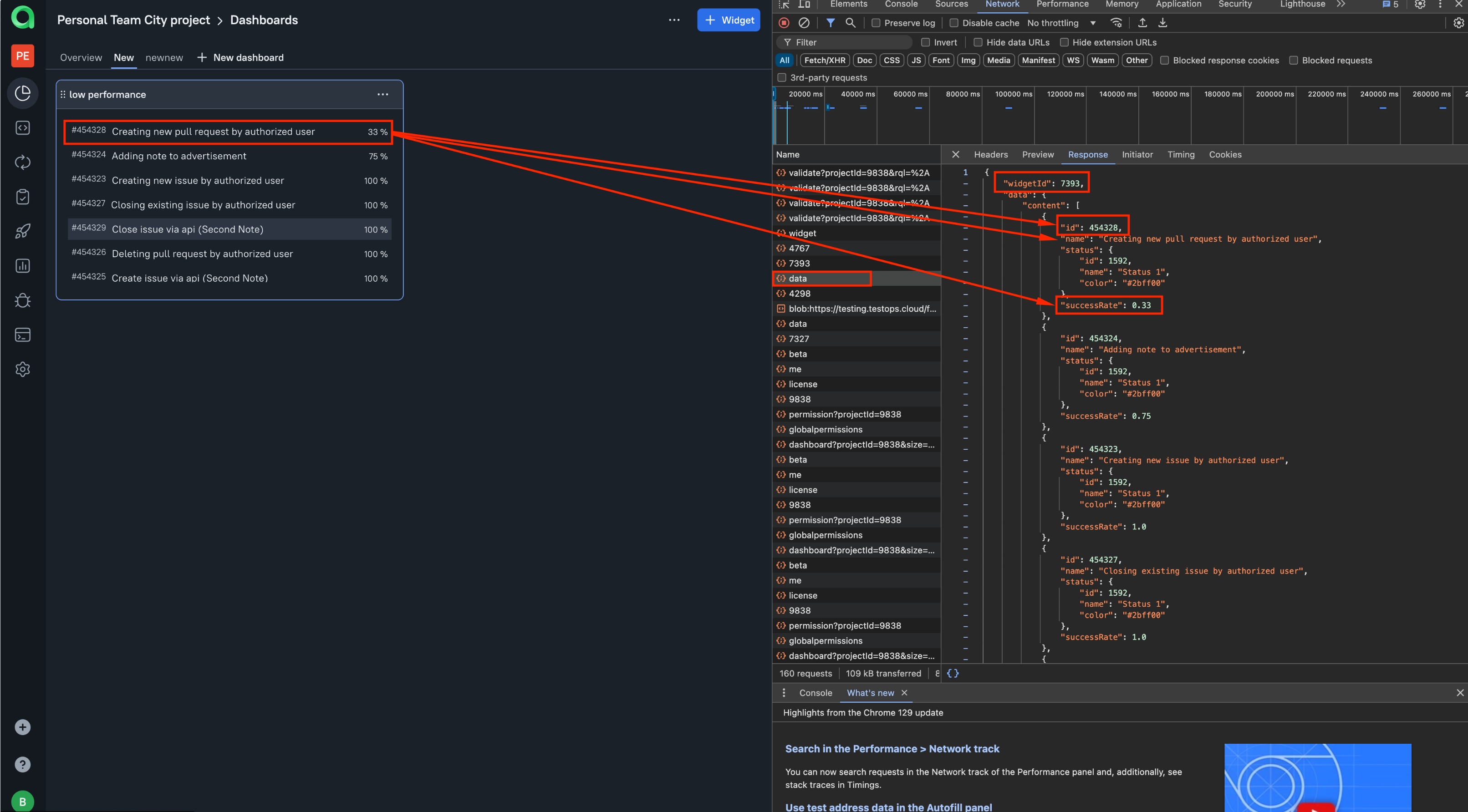
- If your widget contains a large number of test cases, it might span multiple pages. In this case, when writing the script, you'll need to implement a cycle that collects all the data from the request until the last parameter is equal to false.